Humidity loggers are only as good as their calibration. Over time, even high-quality sensors can drift, leading to inaccurate readings. To ensure trials and monitoring are done effectively it is important to calibrate measuring devices.
One of the simplest and most reliable ways to check or calibrate a humidity logger is by using saturated salt solutions. This method is cheap and easy to perform.
In this guide, we’ll walk through a quick and effective two-point calibration method using:
-
Magnesium chloride (MgCl2) for low humidity calibration
-
Sodium chloride (NaCl) for high humidity calibration
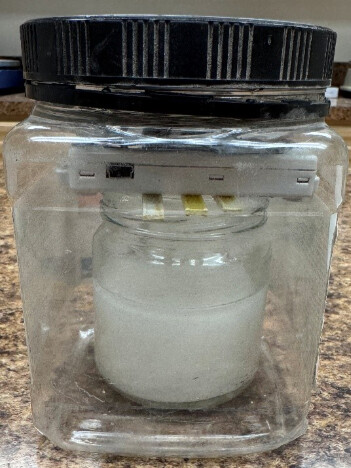
Here is an example of the calibration setup described in this article:
Why Salt Solutions Work
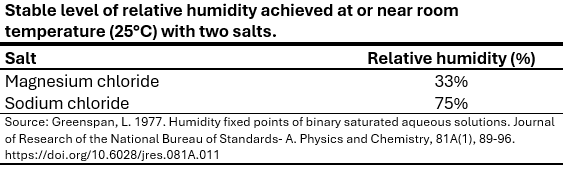
When certain salts are mixed with water until they become saturated, they naturally create a stable relative humidity (RH) environment inside a sealed container. The table below shows target levels of 33% and 75% relative humidity that can be achieved with MgCl2 and NaCl (table salt), respectively, both of which are quite widely available. These levels are reached at or close to 25 degrees Celsius (°C).
What You’ll Need
- Humidity logger or hygrometer that you want to test
- Airtight container with a smaller container that will fit inside it
- Pure water (distilled or water passed through a reverse osmosis membrane; rain water collected in a clean container can also be used; tap water contains variable amounts of minerals and contaminants, depending on the source—it may reduce accuracy by a few percentage points but is a viable option since the primary salt is the main factor influencing the level of stable humidity reached in the container )
- MgCl2 salt (Ideally Reagent Grade)
- NaCl salt (pure or non-iodized table salt preferred)
Step 1: Prepare the Saturated Salt Solutions
For each salt:
- Fill a small cup or jar (see baby food jar used in the photo of the calibration setup) about two-thirds full of salt.
- Slowly add water to the salt.
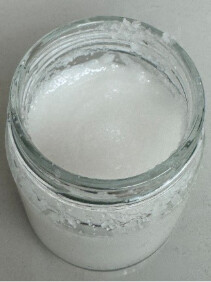
- As you add water, stir the mixture until a thick slurry or paste forms and you no longer see free liquid at the top of the mixture.
The goal is to end up with a wet paste or wet beach sand texture as seen below:
Step 2: Set Up the Calibration Chamber
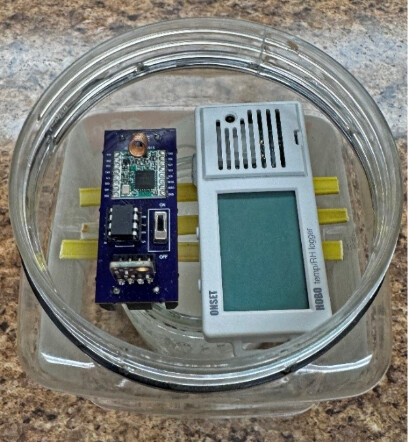
Place the cup or jar containing the salt slurry inside an airtight container. Position the humidity logger(s) inside the container elevated above the salt slurry where it will not fall into the slurry. The airtight container should not be much larger than the container with the salt slurry. If you have too much air in the container, it will take longer for humidity to stabilize. Note the cut pieces of plastic in the photo below, placed over the small salt jar to support the loggers. Once the loggers are in place, close the lid on the outer container; screw the lid on tightly to achieve a good seal, preventing entry of outside air.
Step 3: Allow Time for Stabilization
It is possible that the humidity level will stabilize within a few hours, particularly for NaCl, as ambient humidity will likely be close to the 75% level achieved with saturated NaCl. It is advisable, however, to wait about 24 hours to let humidity fully equilibrate with the air in the container. It is ideal to also monitor temperature, to ensure that the test is done at about 25°C.
NOTE: In testing the saturated salt method at ECHO, we saw the importance of mixing the salt and water to achieve the aforementioned moist beach sand consistency. With MgCl2, for instance, humidity in the outer container stabilized at about 49% with a mixture comprised mostly of free liquid with some solid crystals on the bottom of the salt container. This occurred even though no more salt could be dissolved in the water. The excess free liquid apparently acted as a dilute rather than a saturated solution. At a moist beach sand consistency, the smaller amount of liquid stays fully saturated as the liquid phase equilibrates with the solid phase, keeping relative humidity at the reference value. With a moist beach sand consistency and a research-grade hygrometer, we observed the expected 33% level of relative humidity with MgCl2.
Step 4: Adjust or Record Corrections
Depending on your device:
If the logger supports calibration:
- Perform a two-point calibration adjustment
If the logger does not support calibration:
- Record the observed offsets
- Calculate corrections when reviewing raw data
Tips for Better Accuracy and Performance
- Use distilled water.
- Ensure containers are truly airtight. You can use plumbers tape or parafilm around a screw top container
- Avoid touching the sensor with wet salt.
- Allow enough time (24 hours) for stabilization.
- Keep temperature as constant as possible. If possible, conduct the test in an air-conditioned room.
- Ensure there is no water pooling at the top of the salt, as mentioned earlier. If water pools add more salt to the mixture.
How to correct your relative humidity readings (only necessary if observed values are outside the range of accuracy for your device)
Our example scenario: Let’s say that a hygrometer reads 36% relative humidity (RH) with MgCl2 and 79% with NaCl. Recall that the true reference value is 33% for MgCl2 and 75% for NaCl.
Step 1: Calculate an offset value for each reference salt
Offset = Reference value – Observed value
Thus, for our scenario:
Offset for MgCl2: 33 -36 = - 3
Offset for NaCl: 75-79 = - 4
If both offsets are the same value, or within the sensor’s range of accuracy (see the datasheet or manual for your sensor or logger), then you can perform a one-point calibration correction as follows:
Corrected value = Raw reading + Offset value
For example, let’s say you calculated an offset value of -3 for both salts and only need to use one-point calibration. In that case, a raw relative humidity reading of 80% would be corrected to 80 + -3 = 77%.
Proceed to the next steps, for two-point calibration, if your device gives incorrect values with both reference salts.
Step 2: Calculate the slope correction factor
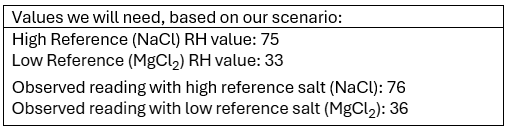
Knowing these values, calculate slope as:
Slope = (High reference RH – Low reference RH)/(Observed RH with high reference salt – Observed RH with low reference salt)
Thus, slope in our scenario = (75 – 33)/(79-36) = 0.9767.
Step 3: Calculate the intercept
The intercept is the corrected humidity value when your device reads 0% relative humidity.
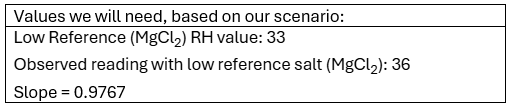
Knowing these values, calculate the intercept as:
Intercept = Reference value with low-reference salt - (Slope x Observed reading with low reference salt)
Thus, the intercept in our scenario = 33 – (0.9767 x 36) = -2.16
Step 4: Correct your readings with a correction formula that incorporates the slope and intercept
Calculate correct values as follows:
Corrected value = (Slope x Observed RH value) + Intercept
For example, based on our scenario, a corrected value for an observed reading of 80% RH is calculated as:
Corrected value = (0.9767 x 80) + -2.16 = 75
This formula can easily be incorporated into an Excel sheet to automate correction of entered raw RH values. Click on “Hygrometer Calibration Tool” for an Exel file illustrating this.